🛡️ Admin 5: Setting user permissions
After Admin 3: Creating groups you decide who may carry out which school-wide actions. This is independent of the Microsoft Entra permissions in Admin 2: Granting access.
The school role (teacher, super admin) and the individual checkboxes are two separate levels. The role describes the function in the school. The checkboxes control specifically whether someone may create global collections, move assignments into them or change admin settings.
Where to open the permissions
Open Settings (gear at the top right).
- On the left, under Admin settings, choose Users.
- Find the person. In the Edit permissions column, click the pencil.
- Check or uncheck the checkboxes and save.
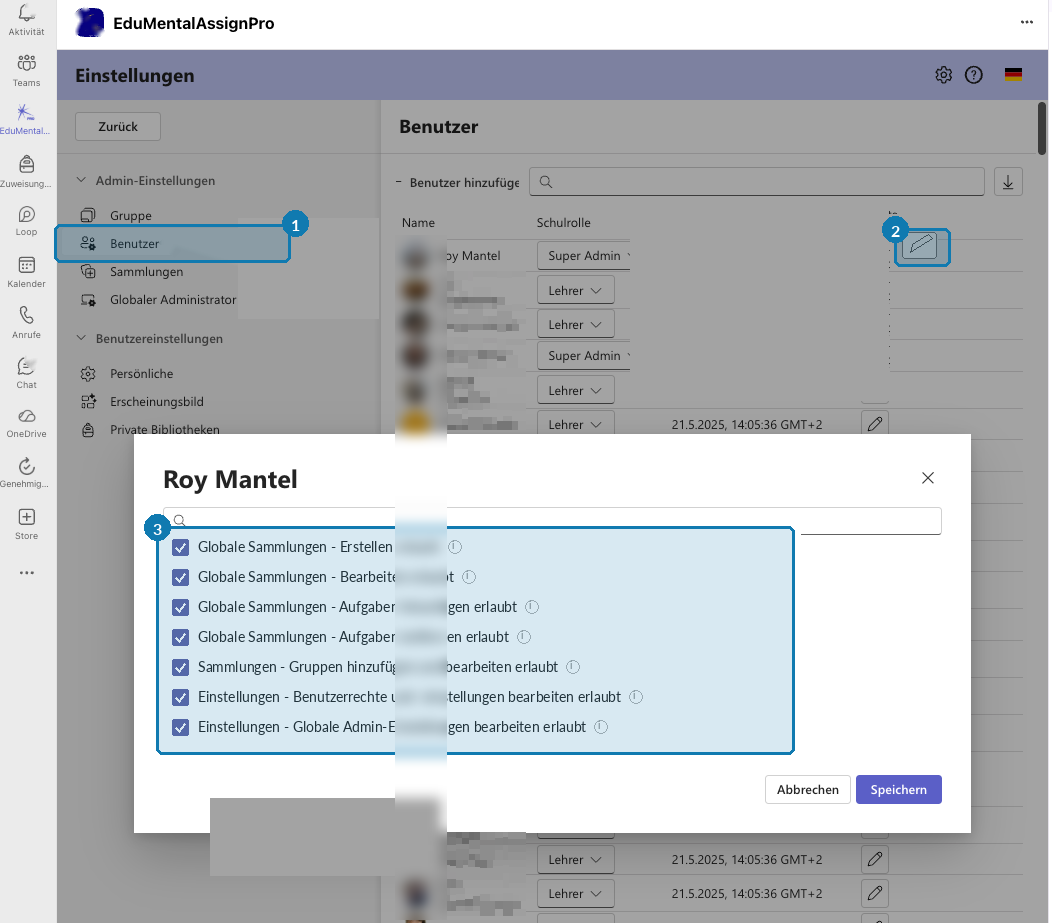
1 = Users menu item. 2 = pencil in the Edit permissions column. 3 = permissions in the dialog (check or uncheck).
Without the Einstellungen – Benutzerrechte und -einstellungen bearbeiten erlaubt permission (edit user permissions and settings), you won’t see the pencil or can’t change other people’s permissions.
Which checkboxes there are
The labels below match the German interface. Clicking the i next to a checkbox shows the quick help in the app.
- Globale Sammlungen – Erstellen erlaubt — create new school-wide collections.
- Globale Sammlungen – Bearbeiten erlaubt — change the name, color and properties of existing global collections.
- Globale Sammlungen – Aufgaben hinzufügen erlaubt — add assignments to a global collection.
- Globale Sammlungen – Aufgaben entfernen erlaubt — remove assignments from a global collection. The assignment itself is not deleted.
- Einstellungen – Gruppen hinzufügen und bearbeiten erlaubt — create and rename groups and manage which teachers and classes belong to them.
- Einstellungen – Benutzerrechte und -einstellungen bearbeiten erlaubt — change other people’s permissions (this dialog).
- Einstellungen – Globale Admin-Einstellungen bearbeiten erlaubt — change school-wide settings, for example under Global administrator.
Recommended assignment of permissions
- Teachers day to day: usually no global admin checkboxes. The school decides whether they may add to global collections.
- Subject or grade-level teams: often add assignments (and remove if needed), without creating or admin settings.
- PICTS (pedagogical ICT support) / super admin: creating and editing global collections plus both settings permissions, if these people look after the school setup.
If teachers can’t create new collections, check this dialog first — not Entra. The same rule is mentioned briefly in Private libraries / collections.
Something not working as it should?
Contact support or, in urgent cases, call +41 76 753 05 02 (regular call or WhatsApp).